Transcript proofreading: a practical audio-check checklist
Proofread a transcript against its recording: the errors machine drafts really make (with a real example), a pass-by-pass checklist, a review ledger and how long to allow.
Try audio transcription free, in your browser →
Transcript proofreading means checking a transcript against its recording, not just reading it for spelling and grammar. Play the audio while you read, and look for the errors that still read smoothly: missing words or whole phrases, wrong names, misheard numbers, flipped negations and misattributed speakers. Fix what the audio supports, mark what it does not as [unclear 12:08], and record your decisions so someone else can check them.
What machine drafts actually get wrong
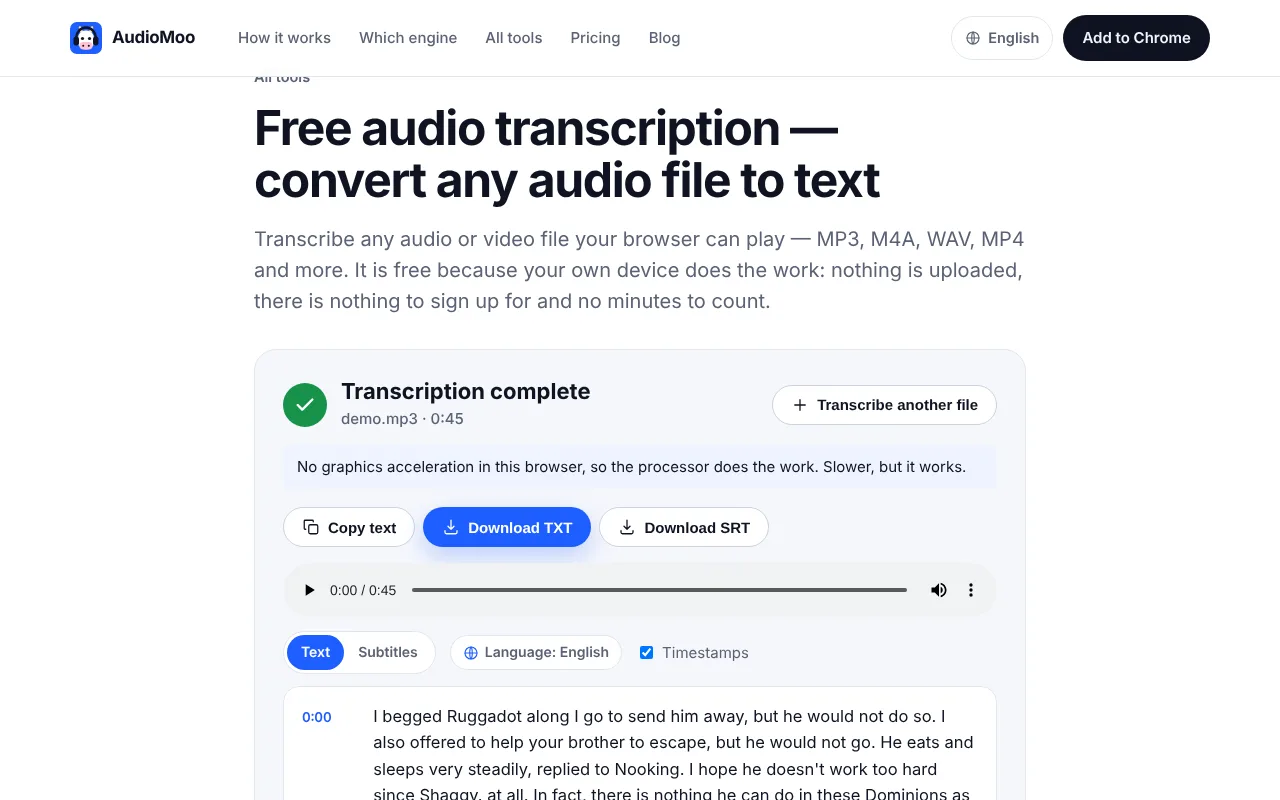
Most transcripts now start as a machine draft, and its errors are different from a typist’s: no typos, but fluent sentences that are wrong. Here is a real example. We ran a 45-second audiobook excerpt from the LibriSpeech test corpus (a public-domain Oz book by L. Frank Baum, with a checked reference transcript) through AudioMoo’s browser tool. Every line below is real output next to what the reader actually said:
| Machine draft | What was said | Type of error | Would a spell-checker catch it? |
|---|---|---|---|
| I begged Ruggadot along I go to send him away | I begged Ruggedo long ago to send him away | Unfamiliar name, words merged | No — “along I go” is valid English |
| replied to Nooking | replied the new King | Phrase misheard as a name | No |
| I hope he doesn’t work too hard since Shaggy. at all. | I hope he doesn’t work too hard, said Shaggy. He doesn’t work at all. | A whole statement missing | No |
| Not exactly, we’ve turned Calico | Not exactly, returned Kaliko | Name and verb misheard | No |
| In Quired Shaggy | Inquired Shaggy | Word split in two | Maybe |
| the Great Dome to Cavern | the great domed cavern | Small word inserted | No |
Out of 120 words, 22 needed an edit, and nearly all of them cluster around names. That pattern is typical: everyday vocabulary comes out well, while names, specialist terms and short phrases spoken quickly are where a draft fails. The most dangerous line is the third one: “He doesn’t work at all” simply is not there, and nothing in the text hints that anything is missing. The word error rate page scores this example in full.
Proofread in focused passes
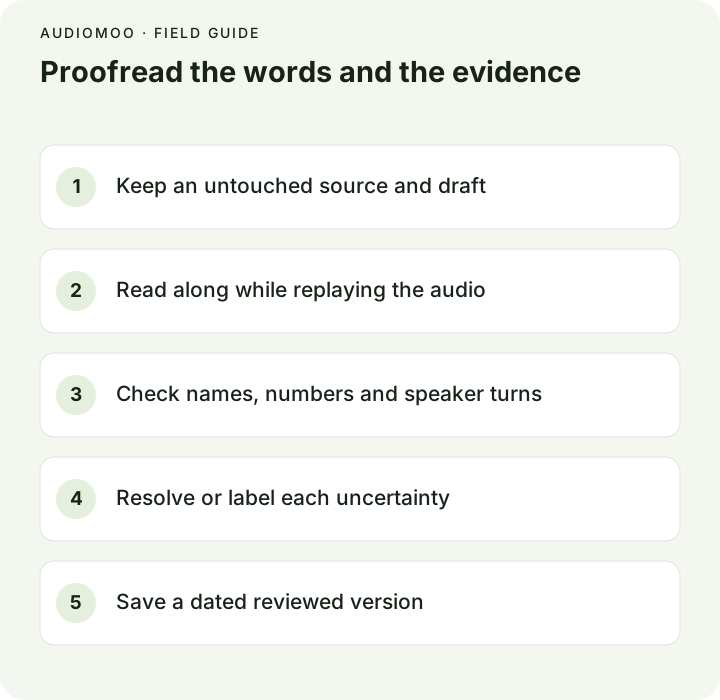
Before you start, keep the original audio and an unchanged copy of the draft, and note the transcript style — full verbatim, clean verbatim, or an edited copy — because each has different rules. See verbatim transcription.
Pass 1 — listen and read, start to finish. Play at normal speed and follow along. Fix obvious errors, but mainly mark spots to revisit. This is where you catch missing phrases: when you hear words that are not on the page, stop and add them.
Pass 2 — names, numbers and terms. Search the draft for every name, organization, place, number, date, amount and technical term. Replay each one and check its spelling against a trusted list — the speaker’s own spelling, an agenda, a programme, a website.
Pass 3 — meaning. Re-listen to every negation (“does” / “doesn’t”), comparison and condition. Machine drafts prefer common phrasings; a rarer construction can be turned into its opposite.
Pass 4 — speakers and structure. Check every turn change and every short reply. If a voice is uncertain, mark it instead of assigning a name from a guess.
Pass 5 — read without audio. Read the whole transcript once more for consistency: name spellings, notation, headings, and leftover notes to yourself.
The checklist
- Completeness: no missing sentences, short replies (“yes”, “no”, “right”) or words after pauses.
- Names and terms: every proper noun checked against a source; spelled the same way throughout.
- Numbers: quantities, dates, prices, percentages and units match the audio.
- Meaning: negations, contrasts and conditions are as spoken.
- Speakers: every turn labelled correctly; uncertain ones marked.
- Timestamps: use the stated basis and point to the right passage. See timestamp formats.
- Notation:
[unclear],[overlap]and editorial notes used consistently and visibly separate from speech. - Style: fillers and false starts handled as the chosen style says, all the way through.
- Privacy and version: identifiers removed only as authorized; file marked draft or reviewed.
Keep a review ledger
| Time | Problem | Check performed | Resolution |
|---|---|---|---|
| 00:01 | “Ruggadot” — unfamiliar name | Replayed; checked the book’s character list | Resolved: Ruggedo |
| 00:15 | Draft jumps from “since Shaggy” to “at all” | Replayed at 0.75× | Resolved: added “said Shaggy. He doesn’t work” |
| 00:28 | “we’ve turned Calico” | Replayed; checked spelling | Resolved: “returned Kaliko” |
| 03:41 | “Marlowe” or “Marlo” | Replayed; no source for spelling | Open: [unclear 03:41 — Marlowe/Marlo] |
The first three rows come from the real example above; the last one is fictional. A ledger describes the check you did, not just the answer. A second reviewer can then focus on the open items instead of starting over.
Tools that make it faster
- Slow playback. Most players can slow audio to 0.75× without making voices unrecognizable; it is the single best tool for fast speech.
- Keyboard control. A key to pause and jump back five seconds saves a surprising amount of time over an hour of audio.
- Click-to-play timestamps. AudioMoo’s result plays the recording from any paragraph you click, so you can jump straight to a passage you are checking.
- A term list. Paste names and terms into a note before you start, then search the draft for likely mishearings of each.
Separate proofreading from editing
Proofreading makes the transcript match the recording and the stated style. Editing changes it for readability — shortening, reordering, smoothing grammar. If an edited version is needed, make it a separate, labelled copy. The National Archives’ transcription guidance makes the same distinction for historical documents: record what is there, and keep transcriber comments clearly apart from it. For research transcripts, the CDC’s qualitative-data guidance recommends reading full transcripts in context before analysis, which a careful final read also gives you.
To start from a draft, use audio to text — it runs in your browser, does not upload the recording and has no minute limit. For the full process around it, see how to transcribe an interview, and for layouts, the interview transcript example.
Questions
How long does proofreading a transcript take? Plan for at least the length of the recording for a single listening pass, plus extra time for every hard passage. Clear audio with one speaker is quickest; overlapping speakers, accents, poor microphones and technical vocabulary all add time.
Can I proofread without the audio? You can fix formatting and obvious typos, but not the errors that matter: missing phrases, misheard names and flipped meanings read perfectly well on the page.
Should I correct the speaker’s grammar? Not in a verbatim transcript. Correct only the transcription. Grammar is the speaker’s; edits belong in a separate edited version.