What is speaker diarization?
Speaker diarization answers “who spoke when”. How it works, how its accuracy is measured (DER, with a worked example), and how to label speakers by hand.
Try audio transcription free, in your browser →
Speaker diarization is the process of splitting a recording by speaker — working out who spoke when. A diarization system does not know anyone’s name: it groups stretches of audio that sound like the same voice and gives each group an anonymous label such as Speaker 1 or Speaker 2. It is separate from speech recognition, which works out what was said; a full transcript with speaker turns needs both.
A simple example
[00:04] SPEAKER 1: Did you book the room?
[00:07] SPEAKER 2: Yes, for Thursday.
[00:10] SPEAKER 1: Great, thank you.
The repeated SPEAKER 1 tells you the same voice returns. It does not tell you that voice is the project manager, and it says nothing about whether “Thursday” was heard correctly. Turn assignment and word accuracy are checked separately.
How diarization works
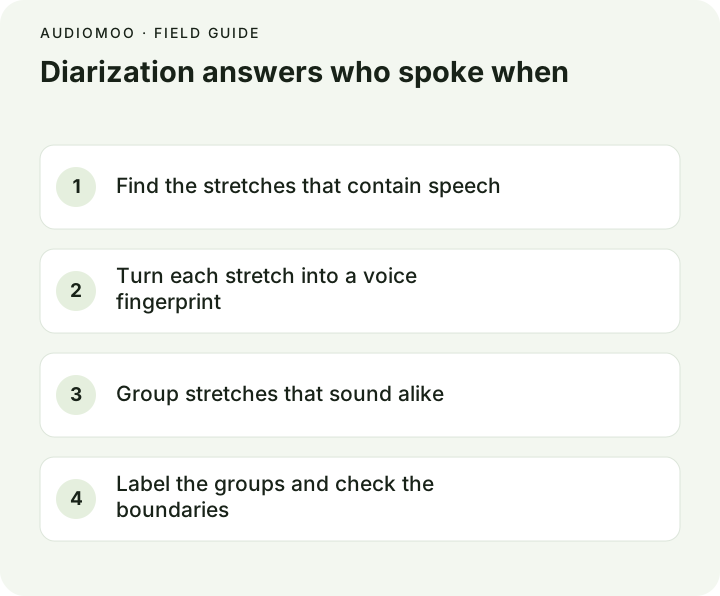
Most systems follow the same four steps, whether they use classic signal processing or a neural network end to end:
- Speech detection. Find the stretches of the recording that contain speech and drop silence, music and noise.
- Segmentation. Cut the speech wherever the voice seems to change.
- Embedding. Turn each segment into a numerical “voice fingerprint” (an embedding) that is close for similar voices and far apart for different ones.
- Clustering. Group segments whose fingerprints are close. Each group becomes one speaker label. Many systems also have to guess how many speakers there are, which is a common source of errors.
Newer end-to-end models can also mark overlapping speech, where two people talk at once — something the classic pipeline handles badly because it assigns each moment to one speaker. The review by Park et al. (2021) in the sources describes both families in detail.
How diarization accuracy is measured
The standard measure is the diarization error rate (DER), used in the NIST Rich Transcription evaluations. It adds up three kinds of mistake, measured in time, and divides by the total amount of speech:
DER = (missed speech + false alarm + speaker confusion) ÷ total speech time
- Missed speech: someone was talking and the system marked silence.
- False alarm: the system marked speech where there was none (a door, a cough, music).
- Speaker confusion: speech was found but credited to the wrong speaker.
A worked example with invented numbers: a 10-minute interview contains 9 minutes of speech. The system misses 12 seconds of quiet replies, marks 6 seconds of a door closing as speech, and assigns 36 seconds to the wrong person.
DER = (12 + 6 + 36) ÷ 540 seconds = 54 ÷ 540 = 10%
Two things about that number matter in practice. First, a short reply credited to the wrong person is a tiny share of the time but can reverse the meaning of an exchange (“Yes” — but who said it?). Second, evaluations often ignore a short “collar” of time around each speaker change, so published scores can look better than what you see at the boundaries. When you compare tools, check the turns that matter in your own recording rather than a headline percentage. The word-level counterpart of DER is the word error rate.
What makes it hard
- Overlapping voices — interruptions, agreement noises, people talking over each other.
- Very short turns — “yes”, “mm-hm”, “right” are too short to fingerprint reliably.
- Similar voices — two speakers of the same age and accent, or siblings.
- Changing conditions — one person moves away from the microphone, or joins a call by phone halfway through.
- An unknown number of speakers — the system has to decide whether a new voice is someone new or a familiar voice in different conditions.
Label speakers by hand with AudioMoo
AudioMoo’s browser tools transcribe speech but do not label speakers; the Pro cloud engine in the extension does not either. For an interview or a small meeting, labelling by hand is quick if you do it in passes:
- Make a draft with audio to text. Paragraphs break at pauses, which often coincide with a change of speaker, and each paragraph carries a timestamp.
- Write a speaker key at the top:
INTERVIEWER — asks the questions,MAYA — participant. Use roles or pseudonyms if the transcript will be shared. - Listen from the start and put a label in front of each turn. Where a paragraph contains two speakers, split it at the change.
- Go back to every short reply and every overlap, and replay a few seconds either side before deciding who spoke. If you cannot tell, mark it —
[unclear speaker]— rather than guessing.
The transcript template has a speaker key and an overlap marker ready to copy, and the interview transcript example shows labelled turns in context.
If you need automatic diarization
Many cloud transcription services and open-source toolkits such as pyannote.audio offer diarization. Before relying on one, run it on a recording that is typical of yours — same room, same number of people, same microphone — and check the turns you care about. Speaker labels are never identification: if the transcript must say who said what, someone who knows the voices has to confirm it.
Questions
Is diarization the same as speaker recognition? No. Recognition (or identification) matches a voice to a known person from enrolled samples. Diarization only groups voices and labels them anonymously.
Does diarization need the number of speakers? Not always, but telling it the number usually helps. Many tools accept a minimum and maximum.
Can diarization tell who is speaking in a phone call recording? If each side is on its own channel (stereo), separating speakers is trivial and diarization is barely needed. If both sides are mixed into one channel, it is a normal diarization problem.